Bitcoin cold storage best practices: a complete guide
Bitcoin cold storage best practices begin with understanding that Bitcoin cold storage is a method of holding Bitcoin private keys on a device or medium that has never connected to the internet, removing the primary attack surface that thieves and malware exploit. Because a private key stored offline cannot be reached by remote attackers, cold storage is the most widely recommended approach for holding bitcoin beyond small, day-to-day amounts. This guide explains how cold storage works mechanically, walks through the main hardware and paper-based options, and covers the specific operational steps that separate a secure setup from a false sense of security.
What is bitcoin cold storage and why does it matter?
Cold storage means keeping the private keys that control a bitcoin address on a device or medium that has no active internet connection. A private key is a 256-bit number; whoever holds it can sign and broadcast transactions. If that number is on an internet-connected phone or laptop, it is exposed to every piece of malware, phishing kit, and remote-access tool aimed at crypto users. Cold storage eliminates that exposure entirely.
The contrast is “hot storage” — wallets on exchange accounts, mobile apps, or browser extensions that remain connected. Hot wallets are convenient for frequent use, but they carry persistent network risk. Cold storage introduces friction by design. That friction is the security mechanism.
The private key is the asset
This is worth stating plainly: the bitcoin itself lives on the blockchain. What cold storage protects is the cryptographic credential needed to move it. Lose the private key and the bitcoin is permanently inaccessible. Hand it to an attacker and the bitcoin transfers immediately and irreversibly. No customer support line reverses that.
Who needs cold storage?
Cold storage is relevant for anyone holding bitcoin they do not plan to move for weeks or months. A small amount on a mobile wallet for routine purchases is reasonable — the convenience trade-off makes sense. Larger holdings or long-term positions present a different risk calculation. The general principle: if losing that amount would materially hurt you, it should not sit on a connected device.
How cold storage works: the technical mechanics
Understanding why cold storage works requires a short look at how bitcoin transactions are constructed.
Transaction signing and the role of private keys
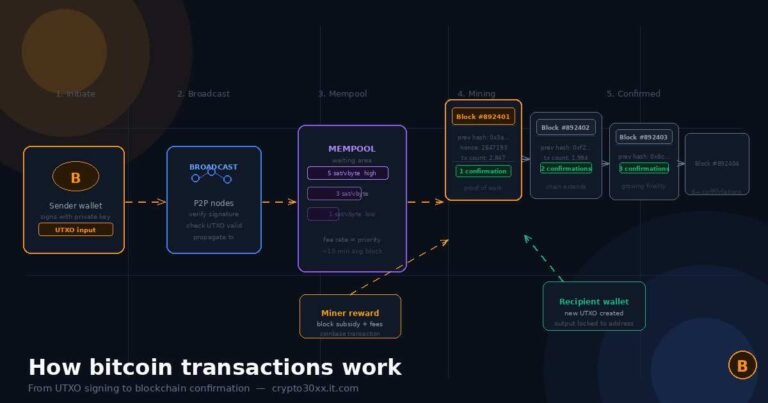
To move bitcoin, the holder constructs a transaction (specifying recipient address, amount, and fee), then signs it with the private key corresponding to the sending address. That signature proves ownership without revealing the key itself. A signed transaction can then be broadcast to the network from any device — it does not need to originate from the machine that signed it.
Cold storage exploits this separation. The signing happens on an offline device. The signed transaction is then transferred to an online device purely for broadcast. The private key never touches an internet-connected environment at any point.
Air-gapped devices
An air-gapped device is one that has no network interfaces active — no Wi-Fi, no Bluetooth, no cellular. Some hardware wallets achieve this permanently by design; they communicate with a computer only through a USB cable for power and data, with the signing logic isolated inside the device’s secure element. Others use QR codes to pass signed transactions across the air gap without any physical connection at all.
The air gap matters because most attack vectors require a network path. Remove the path, remove the attack class.
Types of cold storage: a comparison
Different cold storage methods offer different trade-offs between security, durability, cost, and ease of use. The table below summarizes the main options.
| Method | Security level | Durability | Cost | Complexity |
|---|---|---|---|---|
| Hardware wallet (dedicated device) | Very high | High (if backed up) | Low-medium ($50–$200) | Moderate |
| Air-gapped computer (dedicated) | Very high | High (if backed up) | Medium-high | High |
| Paper wallet | High (if generated correctly) | Low (fire, water, physical damage) | Near-zero | Low to generate, high to secure |
| Metal seed backup | Supplementary | Very high (heat, water resistant) | Low ($20–$80) | Low |
| Brain wallet | Variable (usually low) | N/A | Zero | High risk |
Hardware wallets
A hardware wallet is a small dedicated device — roughly the size of a USB drive — built specifically to store private keys and sign transactions without ever exposing those keys to a connected computer. The private key is generated inside the device’s secure element chip and cannot be exported in plaintext under normal operation.
The computer running the companion software constructs the unsigned transaction and sends it to the hardware wallet. The device displays the transaction details on its own screen, the user confirms on-device, and the signed transaction comes back to the computer for broadcast. At no point does the private key leave the hardware wallet.
Well-known hardware wallet manufacturers include Ledger and Trezor, though the category has expanded significantly. Evaluating a hardware wallet should include checking whether the firmware is open source, whether the secure element chip has been independently audited, and whether the manufacturer has a documented track record for disclosing vulnerabilities.
Air-gapped computers
A dedicated computer that has never connected to the internet — and ideally has had all wireless hardware physically removed or disabled — provides a signing environment with no network interface to exploit. This approach is favored by technically sophisticated users who want full control of the software stack. The tradeoff is complexity: the user must manually manage transaction transfer (typically via USB drive or QR codes), maintain the offline machine’s security, and handle the signing software themselves.
Paper wallets
A paper wallet is a printed document containing a bitcoin address and its corresponding private key, usually as both a QR code and a text string. They are inexpensive and, if generated correctly on an offline machine, eliminate software attack surfaces entirely.
The generation step is critical. Paper wallets generated on an internet-connected machine — or via an online tool — may have exposed the private key during creation. A clean process involves downloading a trusted generation tool, booting a fresh operating system from a live USB with no internet connection, generating the wallet entirely offline, printing to a locally connected printer (not a networked or cloud printer), and wiping the system afterward.
Paper is fragile. Fire, water, UV degradation, and physical damage can destroy a paper wallet permanently. Most practitioners who use paper wallets back them up on metal.
Metal seed backups
Metal backups are not a storage method by themselves — they are a durability upgrade for seed phrases. A seed phrase (discussed below) punched or engraved into a stainless steel or titanium plate survives conditions that destroy paper: house fires, floods, and extreme temperature swings. Metal backups work alongside hardware wallets or paper wallets, not instead of them.
Seed phrases: the most important concept in cold storage
Every cold storage setup ultimately reduces to protecting one thing: the seed phrase.
What a seed phrase is
A seed phrase (also called a recovery phrase or mnemonic phrase) is a sequence of 12 or 24 words, drawn from a standardized list of 2,048 words defined by the BIP-39 specification. This word list encodes the master private key for an HD (hierarchical deterministic) wallet, from which all individual address keys are derived. Back up the seed phrase, and any bitcoin held across any address derived from that wallet can be recovered on any compatible software or hardware.
Lose the seed phrase, with no other backup, and the wallet — and all bitcoin it controls — is permanently inaccessible.
How to store a seed phrase securely
The seed phrase must be kept:
- Offline at all times: Never photograph it, type it into any computer or phone, store it in a password manager, or email it to yourself. Any digital copy of a seed phrase is a potential attack target.
- In at least two physically separate locations: A single copy can be destroyed in a fire, flood, or burglary. Two copies in different physical locations (a home safe and a bank safe-deposit box, for example) eliminate single points of failure.
- Protected from environmental damage: Paper degrades. Metal does not. For any seed phrase intended to hold value for years, a metal backup is the practical standard.
- Protected from unauthorized discovery: A seed phrase does not need to be destroyed to be stolen — it only needs to be seen. Physical security (a locked safe, limited access) matters as much as the backup medium.
Passphrase extension (the 25th word)
BIP-39 supports an optional passphrase — sometimes called the “25th word” — that extends the seed phrase. With a passphrase enabled, the same 12 or 24 seed words produce an entirely different set of addresses. An attacker who obtains the seed phrase without the passphrase accesses a valid but empty wallet. The actual funds require both components.
This adds genuine security but introduces a new failure mode: forgetting or losing the passphrase results in permanent loss. Any setup using a passphrase requires the passphrase to be backed up with the same care as the seed phrase itself — and separately from it.
Bitcoin cold storage best practices: step-by-step setup
The following steps describe a solid baseline cold storage setup using a hardware wallet.
- Buy hardware directly from the manufacturer. Avoid resellers, marketplace listings, and second-hand devices. A device that has passed through unknown hands may have been tampered with.
- Verify the packaging is intact. Legitimate manufacturers ship devices with tamper-evident seals. A broken seal before first use is a disqualifying red flag.
- Set up on a clean, offline computer where possible. Or follow the manufacturer’s guidance carefully. Do not set up while screen-sharing or in a location where cameras could capture the screen.
- Generate the seed phrase on the device itself. Never use a seed phrase provided by someone else, generated on a website, or printed inside the box. Legitimate hardware wallets generate the seed phrase on-device, display it only on the device screen, and never transmit it.
- Write down every word, in order, accurately. Check the spelling against the BIP-39 word list. A single incorrect word can make recovery fail.
- Back up to metal for long-term storage. Transfer the seed phrase to a metal plate before storing. Store the metal backup in a separate physical location from the device.
- Set a strong PIN on the device. Most hardware wallets wipe themselves after a set number of incorrect PIN attempts. Use a non-obvious PIN.
- Test the recovery process before depositing funds. Use the wallet’s built-in recovery verification feature, or restore the seed phrase on a second device with zero balance. Confirm the correct addresses appear. This step confirms the backup works before it matters.
- Send a small test transaction first. After verifying the seed backup, transfer a minimal amount to the wallet and confirm receipt before moving the full amount.
- Document where the backups are stored — but not what they contain — in a manner a trusted person could locate them in an emergency without being able to access them without authorization.
Common mistakes and how to avoid them
Storing the seed phrase digitally
Photographing the seed phrase, typing it into a notes app, or saving it in cloud storage converts a cold storage setup into a hot one. The seed phrase, once digitized, is exposed to every attack vector that cold storage was designed to eliminate. Screenshots can sync to cloud services automatically; cloud accounts can be breached.
Keeping only one copy
A single backup copy is a single point of failure. House fires, flooding, and accidental destruction are real. The redundancy cost — a second metal backup in a second location — is low relative to the risk.
Using a passphrase without backing it up
Adding a passphrase to a hardware wallet is meaningless as a security measure if the passphrase is not itself backed up separately. A passphrase forgotten is funds lost.
Buying from unauthorized channels
A hardware wallet from a marketplace listing, especially one sold at a discount or described as “pre-configured,” is a major red flag. Pre-seeded devices (sold with a seed phrase already set) are a known scam: the seller retains a copy of the seed phrase and drains the wallet after funds arrive.
Failing to verify receive addresses on-device
When depositing bitcoin, always verify the receiving address on the hardware wallet’s own screen before sending. Malware on the host computer can substitute a different address in the software display. The on-device screen cannot be manipulated by host software.
Storing the device and the seed backup together
If both the device and the seed backup are in the same location, a single burglary or fire can destroy both. Physical separation between the device and its backup is a core redundancy principle.
Advanced cold storage considerations
Multisignature setups
A multisignature (multisig) wallet requires signatures from multiple private keys to authorize a transaction. A common configuration is “2-of-3”: three private keys exist, and any two of them can sign a valid transaction. This eliminates single points of failure at the key level — no single compromised key or lost device results in total loss or unauthorized access.
Multisig setups are more complex to configure and to recover than single-key setups. They are used primarily by organizations, large personal holdings, or users who have fully internalized the operational requirements. The added security is real, but so is the added operational burden.
Inheritance and emergency access
Cold storage creates an access problem that hot wallets and exchanges do not: if the holder dies or becomes incapacitated, the bitcoin may become permanently inaccessible. Planning for this requires balancing two opposing needs — keeping the seed phrase secure from unauthorized access while ensuring a trusted person can retrieve it under defined circumstances.
Some approaches include sealed physical envelopes held by a solicitor, documented instructions without the seed phrase itself (pointing to where the backup is stored), and purpose-built inheritance services. There is no universally correct answer, and the appropriate solution depends on the individual’s situation and relationships.
FAQs
What is the difference between cold storage and a hardware wallet? Cold storage is the broader concept — any method of holding private keys offline. A hardware wallet is a specific device designed for cold storage. All hardware wallets are cold storage, but cold storage also includes paper wallets, air-gapped computers, and other offline methods.
Can bitcoin be stolen from cold storage? Bitcoin held in properly implemented cold storage cannot be stolen remotely. Physical theft of the device is possible, but a PIN-protected device and a geographically separate seed backup limit the damage. The most common failure modes are user error, poor backup practices, and buying tampered devices.
How often should I access my cold storage? As rarely as needed. Every interaction with a hardware wallet or offline system is an opportunity for error or exposure. Cold storage is designed for infrequent access. If frequent transactions are needed, consider keeping a small amount in a hot wallet and the bulk in cold storage.
What happens if my hardware wallet breaks or is lost? The device is replaceable. The seed phrase is not. As long as the seed phrase is intact, the same wallet and all its bitcoin can be restored on any BIP-39 compatible hardware wallet or software wallet. This is why seed phrase backup is the central practice, not device preservation.
Is a hardware wallet seed phrase the same as a private key? They encode the same information but in different forms. The seed phrase is a human-readable mnemonic that encodes the master key of an HD wallet, from which individual private keys for each address are derived. The two are interchangeable in practice for recovery purposes.
What is an air-gapped wallet? An air-gapped wallet uses a device with no network connection — no Wi-Fi, no Bluetooth, no cellular — to sign transactions. Communication with an online device happens through QR codes or USB data transfer. Some hardware wallets operate in an air-gapped mode by default.
Should I tell anyone where my seed phrase is stored? This is a personal security and estate-planning decision. The practical concern is that anyone who knows both where the seed phrase is and has physical access to it controls the bitcoin. If emergency access is a priority, consider arrangements that separate knowledge of location from physical access (e.g., a sealed envelope held by a solicitor, or a locked safe where only a trusted person knows the combination).
Disclaimer
This article is published for educational purposes by an independent research and analysis blog. It does not constitute financial, legal, or investment advice, and should not be treated as a recommendation to buy, sell, or hold any asset. Cryptocurrency holdings carry significant risks, including total loss of capital. Readers should conduct independent research and, where appropriate, consult qualified professionals before making any financial decisions.
Bitcoin cold storage best practices come down to one principle repeated across every layer: eliminate single points of failure. The seed phrase stored in one place, the device and backup kept together, the setup tested only after funds arrive — each is a single point of failure waiting to be exploited by circumstance or error. A hardware wallet bought from the manufacturer, a seed phrase backed up in metal at two separate locations, a PIN that protects the device, and a recovery test before depositing real funds: that combination covers the vast majority of realistic risk scenarios. The setup takes a few hours. The benefit persists for as long as the bitcoin is held.
Browse our gentle insights and give your mind the nourishment it craves inside our peaceful library.